
Proof of Address reads a document that shows the applicant’s address and compares it with the address the applicant gave you. The result shows the values found on the document and whether each one matches.
When to use it
- Onboarding that requires a verified residential address
- Confirming an address change
Accepted documents
A document that shows the applicant’s name and address, such as a utility bill, a bank statement or a post letter. A bank statement is accepted when the applicant’s address is written on it. Files can be images or PDFs.Applicant flow
In the Web SDK, the applicant enters their details, chooses the document type, uploads the document or takes a photo of it, and confirms that the text is readable.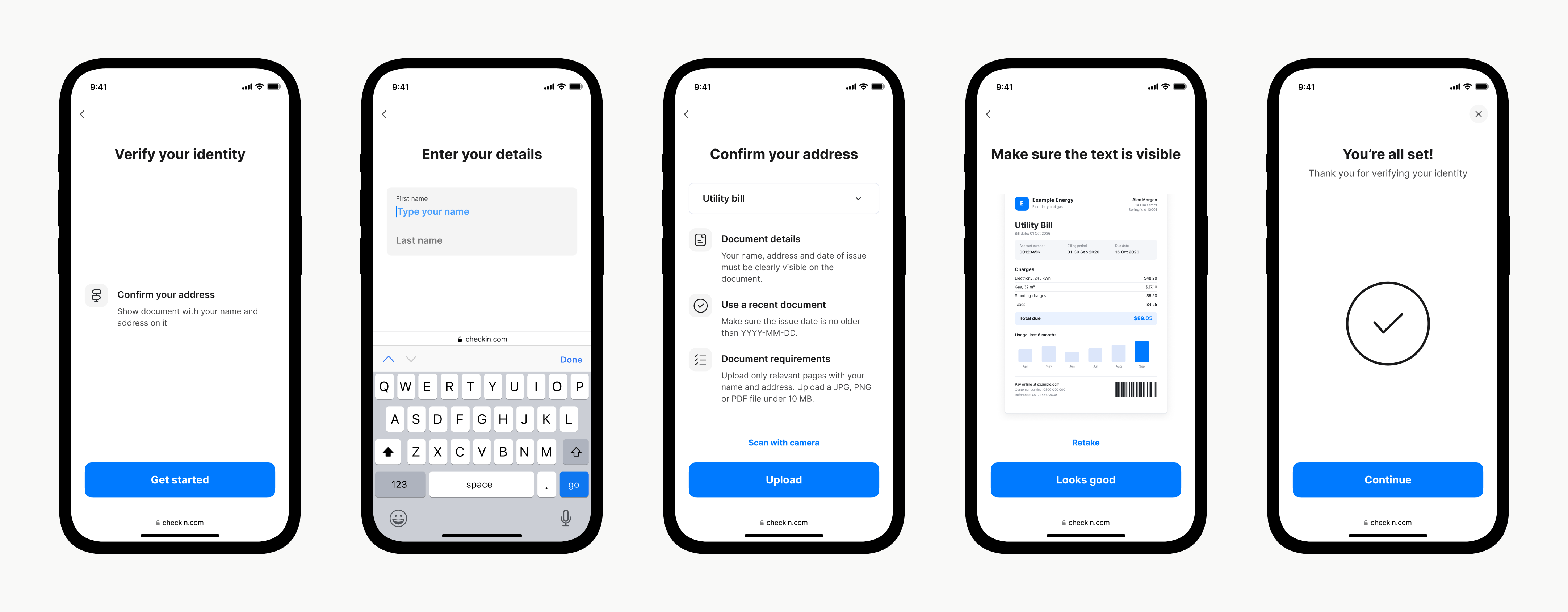
Proof of Address in the Web SDK
Input
Pass the address the document should show. In the SDKs, the applicant uploads the document in the flow. In the API, you send the applicant’s name, address and postcode inapplication.fields, and the document in application.poa.file as a data URI of an image or a PDF.
country is ISO 3166-1 alpha-3.
See Applicant data.
Configuration
In the Backoffice, under Settings → Verification rules → Proof of Address, you choose whether each finding sends the application to review or declines it:- Full name, address or postcode doesn’t match
- Postcode missing on the document
- Document type not accepted
- Document older than a set number of months
Result
Example
Concerns
In API response version 1.7 and below, the same checks use
PO001–PO007.
All codes are in Considers lists.